Q: How to report about problem in Aml Pages?
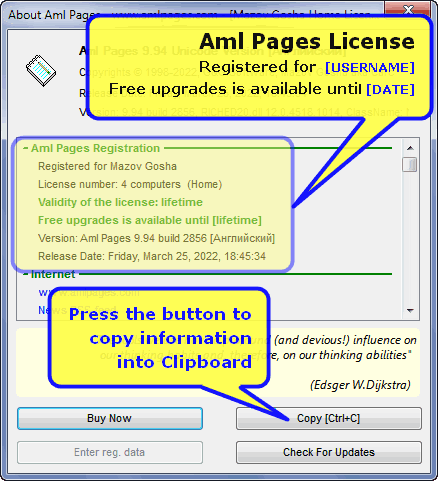
Send us entire information about Your version of Aml Pages.
- Choose menu command "Help\About Aml Pages" (or press Ctrl+Alt+F1).
- Press button "Copy". All the information from the scrollable list above will be copied to the clipboard
This list contains information about the Aml Pages, Windows and many more.
|
|
|
|
|
|
|
|
Q: What is Quick Settings Menu?
|
|
|
Q: How to make CHM-file from Aml Pages document?
Use the plugin Aml2CHM. Learn more about Aml2CHM.
- Download Aml2CHM plugin. Extract all files from ZIP-archive to plugins folder.
- Open any Your document.
- Select menu command "Plugins\Aml2CHM\Make CHM-file from entire document".
- Click "Make CHM-file".
- Complete!
See also
 See video tutorial here See video tutorial here
|
Q: How to resize table cells in text?
For table resizing use richedit 6.0 library (this is the system library for text editor). This library available with Microsoft Offiice 2007 or download from here. Extract all DLL-files from ZIP-archive to Aml Pages directory (e.g. "C:\Program Files\Aml Pages").
Enabling using of RichEdit 60
- Close all documents.
- Click on quick options button.
- Choose command "Use RichEdit 6.0" in context menu.
Ok! You can resize table cells at mouse.
|

|
|
|
|
Q: More splitter features
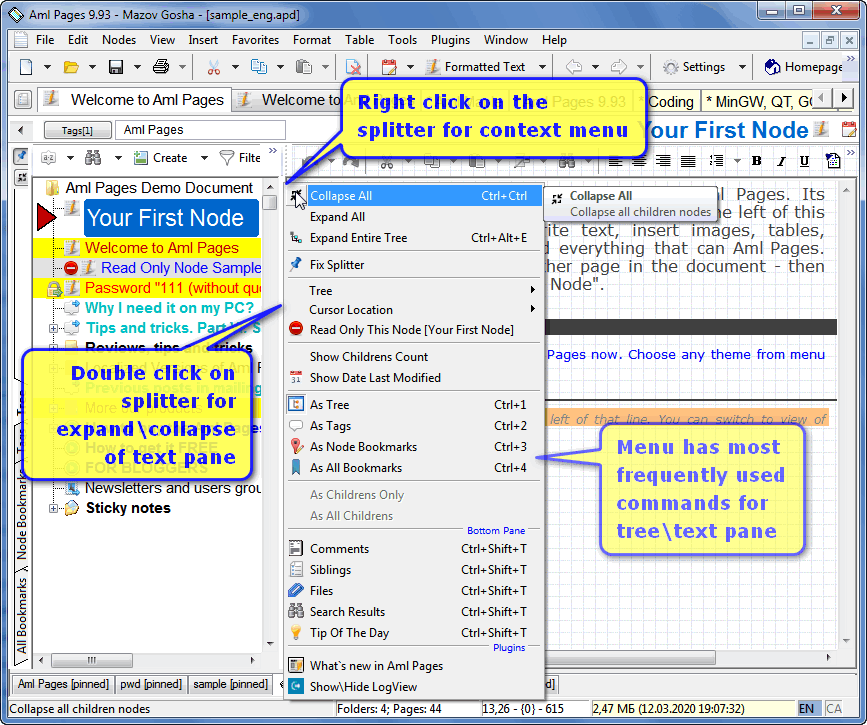
Text and tree splitter implements many operations.
- Right click for popup menu with frequently used commands.
- Double click for expand\collapse text pane.
- Command "Fix splitter": disallow moving of splitter at mouse.
|
|
|
|
Q: How to change user interface quickly?
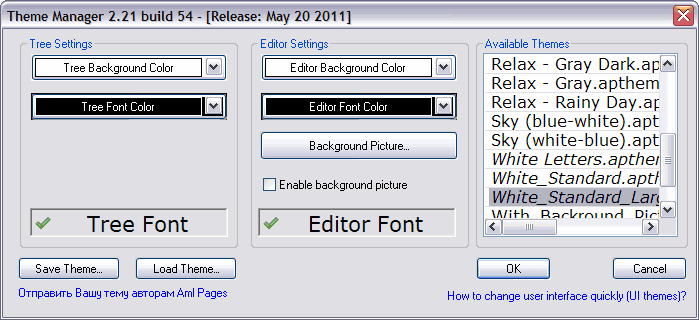
Use Themes for change of user interface.
- Choose menu command "View\Themes\Themes Manager"
- Select any theme from list "Available themes".
Click OK for applying of selected theme. Click Cancel to restore previous settings (see to tutorial screenshot on bottom). The themes supports by versions 9.17 and later. Themes management provide by free plugin Themes.
|
Q: How to save sticky notes positions?
You should change document parameters of Your document.
- Open the Your document.
- Select menu command "Tools\Documents Parameters".
- Check "Save sticky notes positions".
- Click OK.
- Save Your document.
|
|
|
|
|
|
|
|
|


 News
News 






 VK
VK Блог
Блог
 Frequently asked questions for Aml Pages
 How to attach images of web node into Aml Pages document?
 All purchased licenses are valid indefinitely (lifetime), and come with one year of free updates. This means that the license key will work perpetually with any version released within one year from the date of purchase.
 Telegram Group
 ВКонтакте User Group
 See
See